PireosPay – Piraeus Bank Payments for PrestaShop
- Last update 03/03/2026
- PrestaShop version 1.7.X - 9.X
- Module version v1.10.1
Accept card payments through Piraeus Bank directly from your PrestaShop checkout, with support for bank-approved instalment plans and the required validation workflow.
- Support3 months from the purchase date
- Download UpdatesFree download updates as long as you have active support
- License1 license per domain
- Current Version1.8.1
- Compatibilityv1.5.x
v1.6.x
v1.7.x
v8.X
v9.X - Last Update Date (MM/DD/YYYY)03/03/2026
What this module does for you
PireosPay connects your PrestaShop checkout with Piraeus Bank's online payment environment, so customers can pay by card through the bank's secure redirect flow. It also supports instalment options when these are enabled for your merchant account.
- Accept supported card payments through Piraeus Bank without routing checkout through a separate third-party gateway.
- Redirect customers to the bank payment environment and return them to your store after the transaction flow.
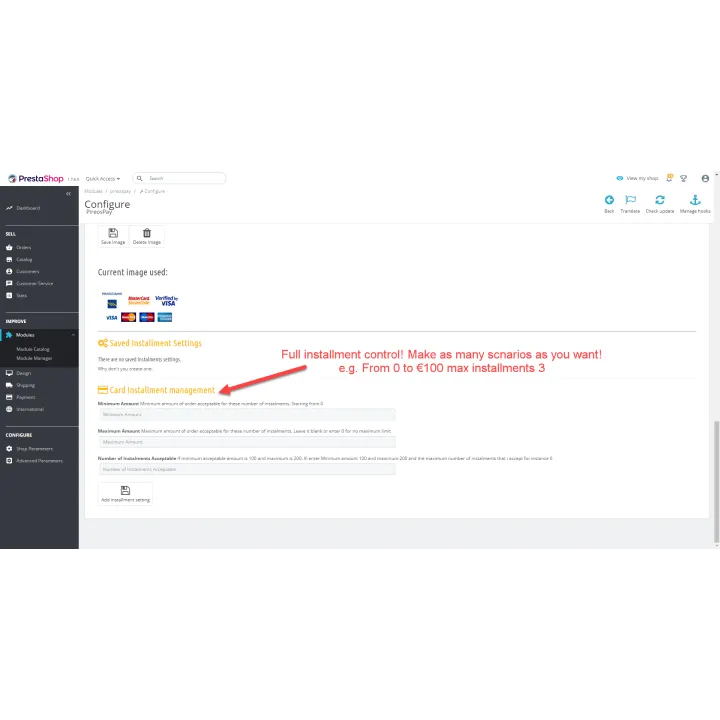
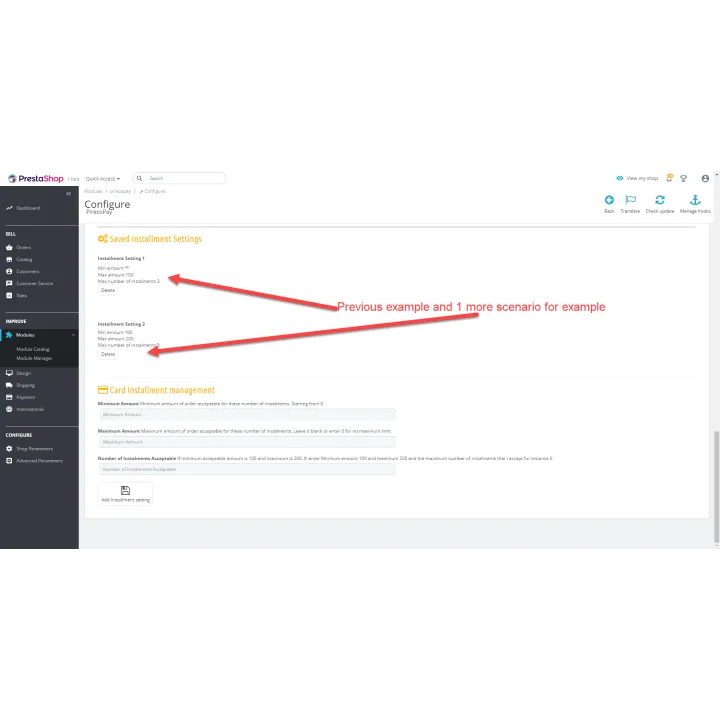
- Offer instalment payments according to the options approved and configured for your Piraeus Bank merchant account.
- Keep the payment method integrated with the normal PrestaShop order workflow.
How it works
- Install the module and enter the merchant configuration supplied by Piraeus Bank.
- Complete the bank test and validation process required for your account.
- Enable PireosPay as a payment method in your store.
- Customers choose Piraeus Bank at checkout and complete payment in the bank environment.
- PrestaShop receives the payment result and continues the order workflow.
Who this module is for
Greek PrestaShop merchants who have, or plan to obtain, an e-commerce merchant agreement with Piraeus Bank and want card payments integrated directly into checkout.
What your customers will like
Customers pay in the familiar Piraeus Bank payment environment and can use instalments when that option is available for the merchant account.
Installation
Installation follows the standard PrestaShop extension workflow. After activation, open the product settings and complete the configuration required for your store.
Before purchasing, make sure you have:
- An active PrestaShop store.
- A Piraeus Bank e-commerce merchant account and the credentials/configuration provided by the bank.
- Completion of the bank testing and validation process.
- The PHP SOAP extension enabled on the server.
Frequently asked questions
Do I need a Piraeus Bank merchant account?
Yes. The module connects to the bank service and requires the merchant configuration supplied by Piraeus Bank.
Does the module support instalments?
Yes, when instalments are enabled and approved for your merchant account by Piraeus Bank.
Are card details entered inside my PrestaShop store?
The payment flow uses the bank redirect environment, so the customer completes the card-payment step through Piraeus Bank.
Is bank validation required before going live?
Yes. You must follow the testing and validation process provided by the bank before production use.
Does the server need anything special?
Yes. The PHP SOAP extension must be enabled.
Change log
Changes v1.10.1 (08/08/2026)
- Added full compatibility with PrestaShop 8.x and 9.x
- Fixed a session issue that could log the customer out when returning from the bank's payment page, causing the order to be lost
- Added proper verification of the bank's payment confirmation for extra security
- Fixed a bug that could corrupt the CSS file generated for the bank
- Added support for accepting payments in more than one currency
- Added a payment details panel on the order page (Card or IRIS, approval code, bank reference numbers)
- Fixed incorrect or missing messages shown to customers for some IRIS payment failures
- Stopped showing raw technical bank error messages to customers
- Added an automatic hourly check with email alert for payments that may be lost if the customer's browser does not return to the shop (mostly affects IRIS)
- Added a documentation panel with PDF guide links inside the module's settings page
Changes v1.8.1 (03/03/2026)
- Fixed return message after cancelling the payment
- Fixed compatibility with version 9.X
Comments (0)
Your review appreciation cannot be sent
Report comment
Report sent
Your report cannot be sent